Open and preview your first .riv file
RAV (Rive Animation Viewer) lets you preview a Rive runtime file on your desktop without setting up a web project. Open a .riv, choose what plays, then use its ViewModel controls to test the animation's response. You'll need RAV and a .riv file exported from Rive.
Already installed? Jump to opening your file. Looking for the app? Choose a RAV download.
Install RAV
RAV is available as a desktop application for macOS (Apple Silicon and Intel) and Windows. Download the latest release from the GitHub Releases page.
macOS
- Download the
.dmgfile for your architecture (Apple Silicon or Intel) - Open the DMG and drag RAV to your Applications folder
- Launch RAV normally. Current releases are Developer ID signed, notarized, and stapled for Gatekeeper.
- Use Open With → RAV for a
.rivfile. Installation keeps your existing default app; see file associations if you want double-clicking to open RAV.
Windows
- Download the x64 setup
.exeor.msiinstaller - Run the installer and follow the setup wizard
- RAV will be available from the Start menu and registers its dedicated
.rivdocument icon
1. Open a .riv file
Launch RAV and click OPEN in the top toolbar, or drag your .riv onto the window. The file loads into the canvas using its default playback target. Use a runtime .riv export; a Rive source project (.rev) cannot be opened directly.
2. Choose the artboard and playback
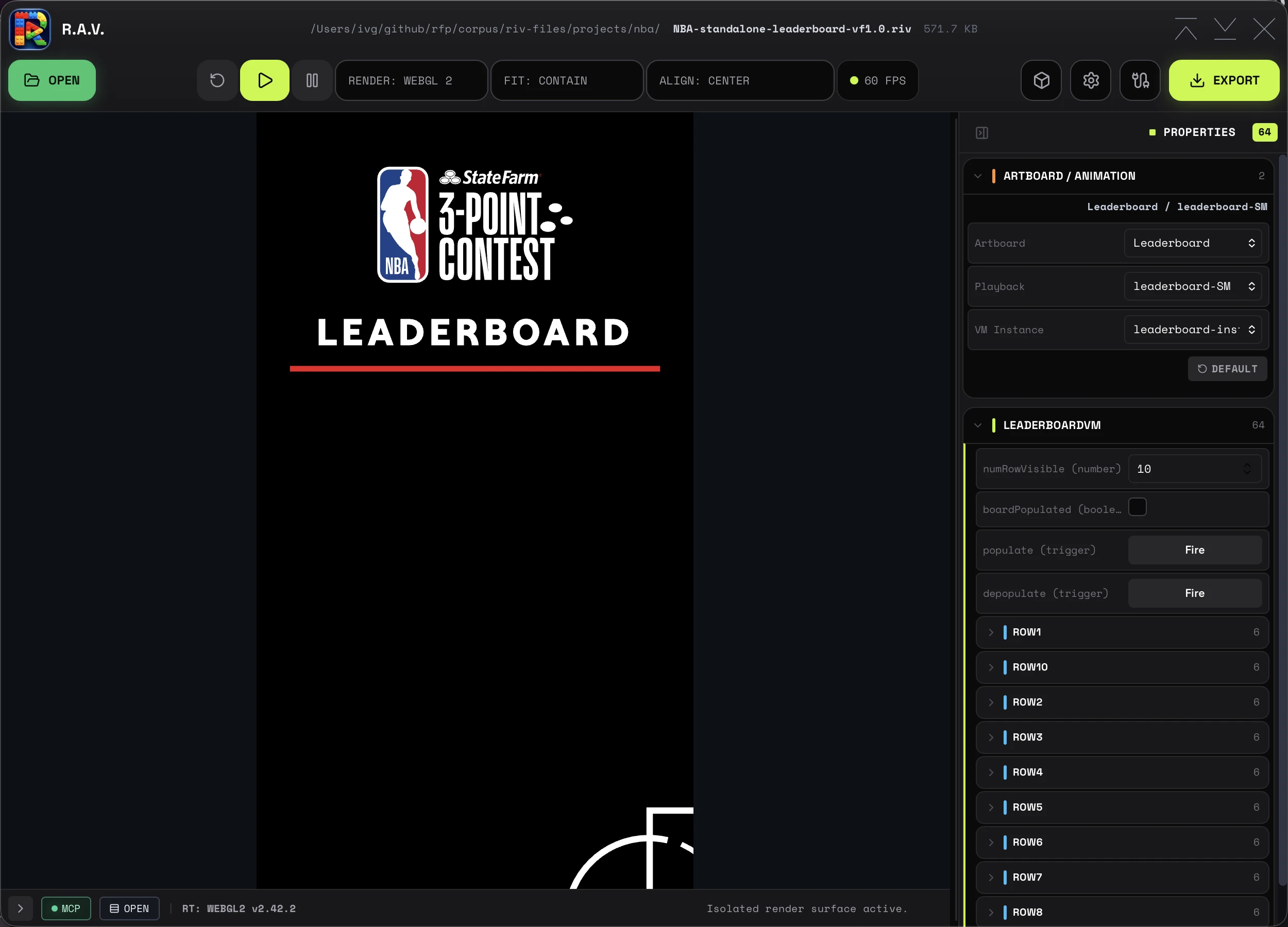
In Properties → Artboard / Animation, choose an Artboard, then a Playback target. The list contains the state machines and timeline animations authored on that artboard. Choose a state machine to test an interactive flow, or a timeline animation to preview a specific sequence.
Use the toolbar's play and pause controls. A timeline animation also shows a scrubber above the bottom status bar; drag its playhead to pause and inspect a frame. State machines do not show that fixed-duration scrubber. For an overview of the full artboard, choose Fit: Contain in the toolbar.
See artboards, playback and VM instances for the full selection controls.
3. Test ViewModel values
Expand a ViewModel section in Properties. RAV shows controls for the properties available in the loaded file. Try one change at a time:
- Change a number or toggle a boolean and watch the canvas.
- Edit a string, then press Enter or leave the field to apply it.
- Click Fire on a trigger to send that one-shot action.
- If the artboard exposes different authored instances, use VM Instance to try their values.
A visible response depends on how the file's animation is bound to that property. For example, the leaderboard above exposes a numRowVisiblenumber and a populate trigger; those names belong to that file, not every Rive animation. RAV exposes ViewModel properties here, not legacy state-machine input controls.
Learn more about ViewModel controls, nested values and lists.
If nothing moves or no controls appear
- No motion: check Playback and press play. An interactive state machine may wait for a pointer action or a ViewModel change.
- No ViewModel controls: the file or selected artboard may have no writable ViewModel properties. Check the Artboard selection and, when available, VM Instance. A file can contain animation without editable properties.
- A value changes but the canvas does not: check that the selected playback target uses that property. A control is not a guarantee of a visible effect.
- A file fails to load: check the console and the troubleshooting guide before changing runtime settings.
Once playback and controls work, explore standalone HTML and code snippets or media export and recording in the desktop app.
For developers: browser preview
The repository also includes a browser development viewer. It is not the desktop installation path: a source checkout without the separately distributed inspection module cannot open files, and browser-only runs do not provide the native export workflow. Follow the repository setup instructions if you are developing RAV; use the desktop release for this walkthrough.