
Export + Snippets
RAV can export self-contained HTML demo files and generate canonical web instantiation snippets for embedding animations in your codebase.
Video, animated-image, and still-image output uses the separate desktop Media Export & Recording workflow in the same EXPORT menu.
These are separate outputs. A snippet is intentionally small setup code plus a window.riveProperties object containing only the property accessors you selected. A standalone HTML export includes the runtime, embedded animation, viewer UI chrome, controls, and selected-value restoration.
What Gets Exported
- The
.rivbinary, base64-encoded and embedded - The selected runtime (Canvas or WebGL2) bundled inline
- The selected runtime semver baked in
- The current artboard, playback target, and active live source mode
- Only the checked or changed ViewModel / state-machine values
- The embedded raster catalog used by each image property's single source select
- The raw applied editor config and lifecycle callbacks when Editor mode is active
- The generated canonical instantiation snippet (CDN and local variants)
- Canvas sizing mode (auto or fixed pixel dimensions)
- Complete styling for standalone viewing
Snippet & Export Controls
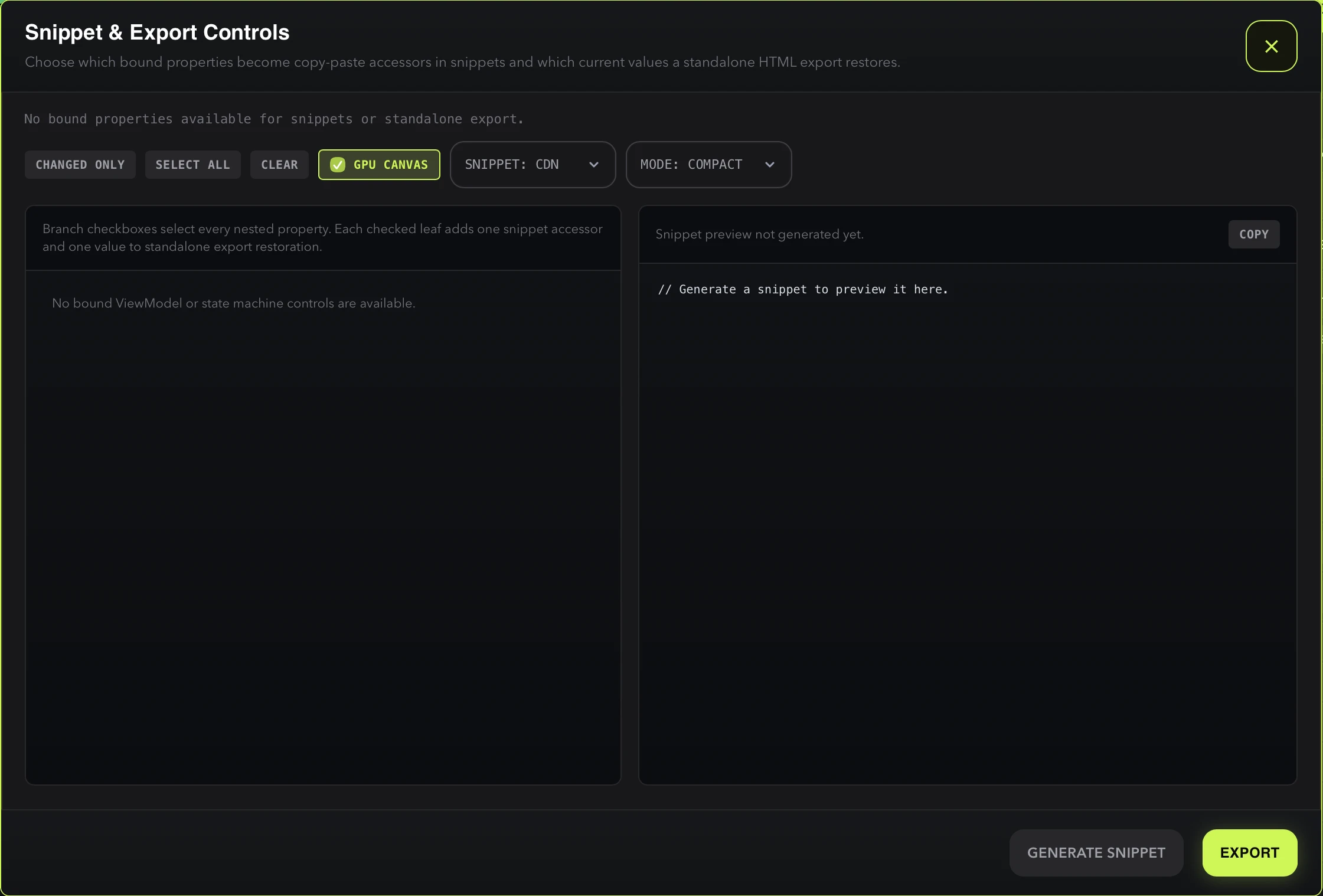
The export dialog is shared by snippet generation and standalone export. It provides:
- Tree checkboxes — branch checkboxes select entire nested sections, leaf checkboxes select individual controls
- Presets — CHANGED ONLY (default), SELECT ALL, CLEAR
- Package source — CDN vs LOCAL (see below)
- Snippet mode — COMPACT vs SCAFFOLD (see below)
- GPU CANVAS — WebGL2 only (see below)
- Inline preview — live code preview with COPY button
- GENERATE SNIPPET — copies the snippet to clipboard
- EXPORT — saves a standalone HTML file
Package source: CDN vs LOCAL
Controls how the generated snippet pulls in the Rive runtime.
- CDN (default) — emits a runtime
<script>tag pointing at the pinned@rive-app/webgl2or@rive-app/canvasversion on unpkg, then attaches selected property accessors towindow.riveProperties. Drop-in for static HTML, design tools, prototypes, and CodePen. - LOCAL — emits ES-module
importstatements that resolve against your project’snode_modules(e.g.import * as rive from "@rive-app/webgl2"). Pick this when you’re inside a bundler — Vite, Next.js, Webpack — so version pinning, tree-shaking, and TypeScript types come from your ownpackage.json.
Snippet mode: COMPACT vs SCAFFOLD
Controls how much of the bound accessor surface ends up in the snippet body.
- COMPACT (default) — only the controls you ticked in the tree appear as direct typed runtime accessors. Captured values are not inlined. This is the smallest ready-to-paste form for wiring the properties your page actually uses.
- SCAFFOLD — emits every available control on the loaded animation, but comments out the unselected accessor lines. Use it as a starter map when you expect to expose more controls later: uncomment the lines you need without re-opening RAV. Pairs well with SELECT ALL or CHANGED ONLY presets when you want a documented map of the full control surface.
These two axes are independent — CDN + COMPACT is the default for prototyping embeds, LOCAL + SCAFFOLD is the most useful when you’re pulling the snippet into an app and want all controls documented. MCP clients can drive both via thepackage_source and snippet_mode arguments ongenerate_web_instantiation_code and rav_export_demo_visual.
GPU Canvas
Available only when the WebGL2 renderer is active, matching the toolbar toggle described in UI Layout. Enabling GPU CANVAS adds enableGPUCanvas: true to the generated snippet or standalone export and sets useOffscreenRenderer: false, so exported and embedded animations render with the same Rive GPU Canvas features — such as 3D shaders — as desktop playback.
Exporting Workflow
- Load and configure your animation in RAV
- Adjust playback, runtime, controls, and canvas sizing to the desired state
- Click EXPORT in the toolbar
- Use the dialog to choose snippet accessors and standalone-export values
- Copy the snippet directly or save a standalone HTML file
Applied editor callbacks and non-toolbar config execute in the exported standalone page after its binding and snapshot-restore lifecycle. Changes still marked as an unapplied draft remain out of the export.
ViewModel Control Parity
Standalone exports rebuild the live ViewModel list-label resolver and embedded-image catalog. Authored list labels therefore follow the same direct-name or unique canonical-string rule, with ambiguous items falling back to Row N, and image properties retain one full-width select containing every embedded raster asset,Open file…, and Clear, backed by a hidden file input. The catalog preserves uniqueFilename identity, magic-byte MIME detection, and duplicate-name disambiguation.
Generated snippets do not rebuild this control panel. They expose selected accessors such as window.riveProperties["viewModel/card/title"], whose value or fire()/trigger() API can be used directly from the host page.
Canvas Sizing in Exports
When the viewer is pinned to a fixed canvas size, exported demos and generated snippets preserve those exact pixel dimensions. In RAV, overflow-safe auto margins keep a fixed canvas centered while it fits; once it exceeds the viewport, those margins collapse so scrolling starts at the authored top-left origin.
Limitations
- WebGL2 exports require a browser with WebGL2 support
- File size depends on the embedded
.rivanimation