Artboard Switcher
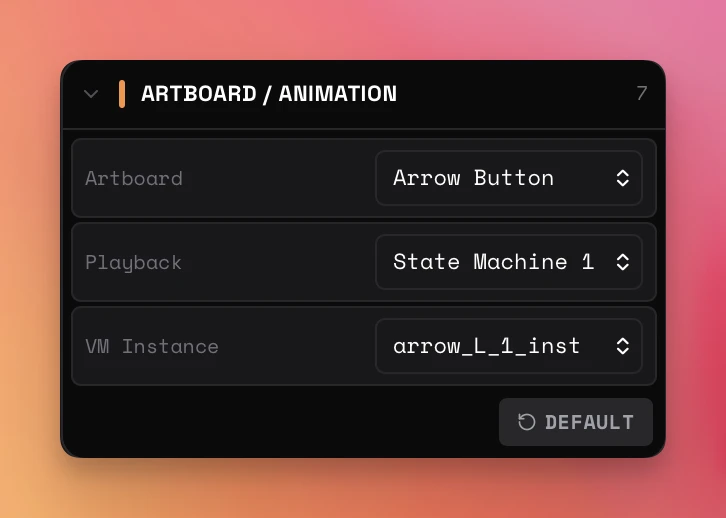
RAV can display any artboard in a .riv file and switch between them without reloading the file. The Artboard / Animation control section appears in the Properties panel when a file is loaded.
Artboard Dropdown
Lists every artboard in the loaded file. RAV prepares a replacement playback surface while keeping the last confirmed frame visible, then swaps only after the requested artboard, playback target, and ViewModel instance are ready. Rapid changes discard stale requests instead of flashing an intermediate surface.
Playback Dropdown
Shows the exact authored state machine and timeline animation names available on the selected artboard. Labels preserve original capitalization and formatting. State machines are listed first.
Timeline Progress
When the selected target is a timeline animation, a dedicated scrubber row appears above the runtime status bar. Select the readout to switch between frames and seconds, use the frame-aligned ruler to judge position, or drag the large unclipped current-time indicator to seek: grabbing it pauses playback and each drag position seeks to that exact frame. The indicator advances on every rendered animation frame at the authored speed and direction. State machines hide the entire row. The same authored time/frame scale can be used to define an exact segment in Media Export.
VM Instance Selector
Whenever the selected artboard has a ViewModel instance, the dropdown is populated—even when there is only one. The default entry preserves Rive's automatic binding. Choosing a named or numbered instance reloads it with manual binding and re-renders the controls with that instance's values.
Reset to Default
The DEFAULT button returns to the artboard, playback target, and ViewModel binding detected when the file was first loaded. Playback and Properties are restored together on the confirmed visible surface.
Export Behavior
Standalone exports and generated snippets always capture the exact artboard, playback target, and ViewModel state currently shown in the viewer.