
Script Editor
The left panel is a CodeMirror editor for a Rive instantiation config— the JavaScript object passed to new Rive(...). The buffer is a draft while RAV is in internal mode; it becomes the live source only after you click APPLY and enter editor mode.
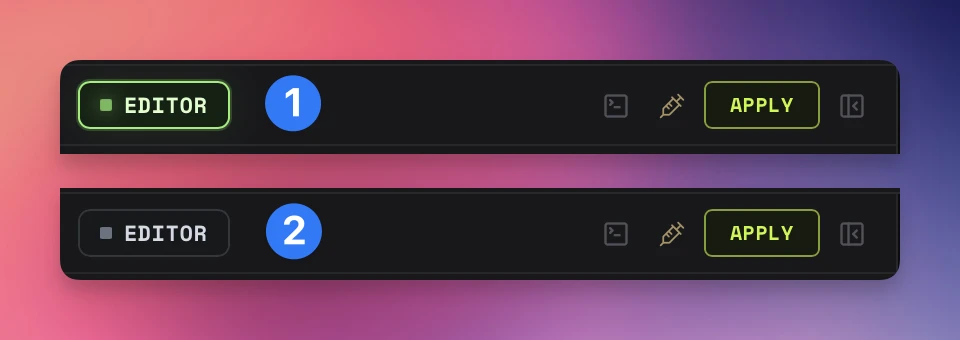
Internal — dim dot, RAV's built-in wiring is driving the runtime; the buffer is just a draft
Editor mode — green pulsing dot, the last applied editor config is driving the runtime
What goes in the editor
The editor accepts a JavaScript object literal — not JSON. Comments, trailing commas, unquoted keys, template strings, arrow functions, and async lifecycle callbacks are all valid:
({
  // Automatically bind the file's default ViewModel instance
  autoBind: true,

  // State machine activation (string or array)
  stateMachines: "MainSM",

  // Layout
  layout: { fit: "contain", alignment: "center" },

  // Pinned canvas pixels
  canvasSize: {
    mode: "fixed",
    width: 1920,
    height: 1080,
    lockAspectRatio: true
  },

  // Lifecycle hooks — RAV exposes the live instance on window.riveInst
  onLoad: () => {
    window.riveInst.resizeDrawingSurfaceToCanvas();
    window.refreshVmInputControls?.();
  },
  onStateChange: (event) => console.log("state:", event),
  onAdvance:     (event) => console.log("advance:", event),
  onPlay:        ()      => console.log("play"),
  onPause:       ()      => console.log("pause"),
  onStop:        ()      => console.log("stop"),
  onLoop:        (event) => console.log("loop:", event),
})
Supported config keys
artboard— specific artboard by name (defaults to file's default artboard)stateMachines— state machine name (string or array)animations— timeline animation name (string or array). Mutually exclusive withstateMachinesautoplay— start playback immediately (defaulttrue)autoBind— bind the default ViewModel instance automatically. Explicit VM selection usesfalse, then binds the selected instance before restoring controlslayout—{ fit, alignment }; both surfaced in the toolbarcanvasSize—{ mode: "fixed" | "auto", width, height, lockAspectRatio }useOffscreenRenderer— can improve glow / shadow quality when rendering to a transparent canvas, at a small performance costonLoad,onPlay,onPause,onStop,onLoop,onAdvance,onStateChange— lifecycle callbacks
Apply & Reload
The yellow APPLY button in the editor header evaluates the buffer, tears down the current Rive instance, and creates a new one with the parsed config. The artboard, playback target, and bound control values are preserved as far as the runtime allows.
Edits to the buffer do nothing to the running animation until you click APPLY. Exports, snippets, MCP status, and the runtime strip all reflect the active live mode — not the unsaved buffer.
Internal vs Editor live mode
RAV draws a sharp line between the editable draft and the source actually driving the runtime:
- Internal — RAV's built-in wiring (toolbar selections, artboard switcher, control panel inputs) drives the animation. The editor buffer is a draft; nobody is reading it.
- Editor — the last applied editor config drives the animation. Toolbar changes are layered on top, but lifecycle callbacks, custom canvas sizing, and any non-toolbar config in the buffer are authoritative.
The runtime strip's SOURCE chip and the editor header dot both reflect this state, and you can flip it from MCP via rav_configure_workspace with source_mode: "editor" or "internal".
Standalone export preservation
When editor mode is active, standalone export carries the raw appliededitor object and its lifecycle callbacks into the self-contained HTML file. The exported runtime executes that config after its own ViewModel binding and snapshot restoration, so callbacks and non-toolbar settings survive outside RAV. Draft edits that have not been applied are not treated as live export configuration.
The live instance: window.riveInst
RAV always exposes the active Rive instance on window.riveInst. Lifecycle callbacks should reach for that global rather than capturing a local rive variable — after every APPLY the instance is replaced, and a captured local will go stale. Helpers worth knowing:
window.riveInst.resizeDrawingSurfaceToCanvas()— call insideonLoadto lock the drawing buffer to the current canvas pixel sizewindow.refreshVmInputControls?.()— tells the right-panel control list to re-render after a runtime changewindow.vmGet / vmSet / vmFire— convenience wrappers installed only when the VM Explorer snippet is injectedwindow.riveProperties— an object of selected typed property accessors exposed by generated CDN and local snippets; RAV itself does not use it internally
VM Explorer snippet
The editor toolbar exposes an Inject VM Explorer action that prepends a small read-only snippet to the buffer. The snippet introspects the loaded ViewModel hierarchy on onLoad and prints a tree of paths, types, and current values to the console. Useful when you don't know the shape of a file's bindings yet.
The same toggle is available from MCP via rav_configure_workspace with vm_explorer: "inject" or "remove".
MCP from the editor
Every editor action has an MCP equivalent for agent-driven workflows:
rav_get_editor_code— read the current buffer (returns whatever is in the editor, dirty or not)rav_set_editor_code— replace the buffer (does not apply — callrav_apply_codenext)rav_apply_code— equivalent to clicking APPLY (requires Script Access)generate_web_instantiation_code— emit a copy-paste snippet that mirrors the live mode currently running in RAV (CDN or local, compact or scaffold)rav_status— surfacessourceModeand adraftDirtyflag so an agent can tell whether unsaved buffer changes exist
Build & runtime info
The editor panel's footer shows the current RAV release, build hash, runtime package, runtime version, and which version was actually requested. These are baked into every standalone export so you can later confirm exactly which combination produced a given demo file.