
MCP Integration
RAV includes a bundled native MCP (Model Context Protocol) sidecar that lets Claude Code, Claude Desktop, Codex, or any MCP client control the viewer remotely.
How it works
MCP Client <-(stdio)-> rav-mcp sidecar <-(WebSocket)-> RAV AppThe sidecar starts automatically with the app. The runtime strip MCP indicator reports bridge health and turns blue for 30 seconds after an agent command arrives.
Ready — green, the bridge is healthy and available
Recent command — blue for 30 seconds after MCP activity
Connecting — yellow while the bridge starts or reconnects
Error — red after a bridge failure while retrying
Off — muted and crossed out when MCP is disabled
Setup
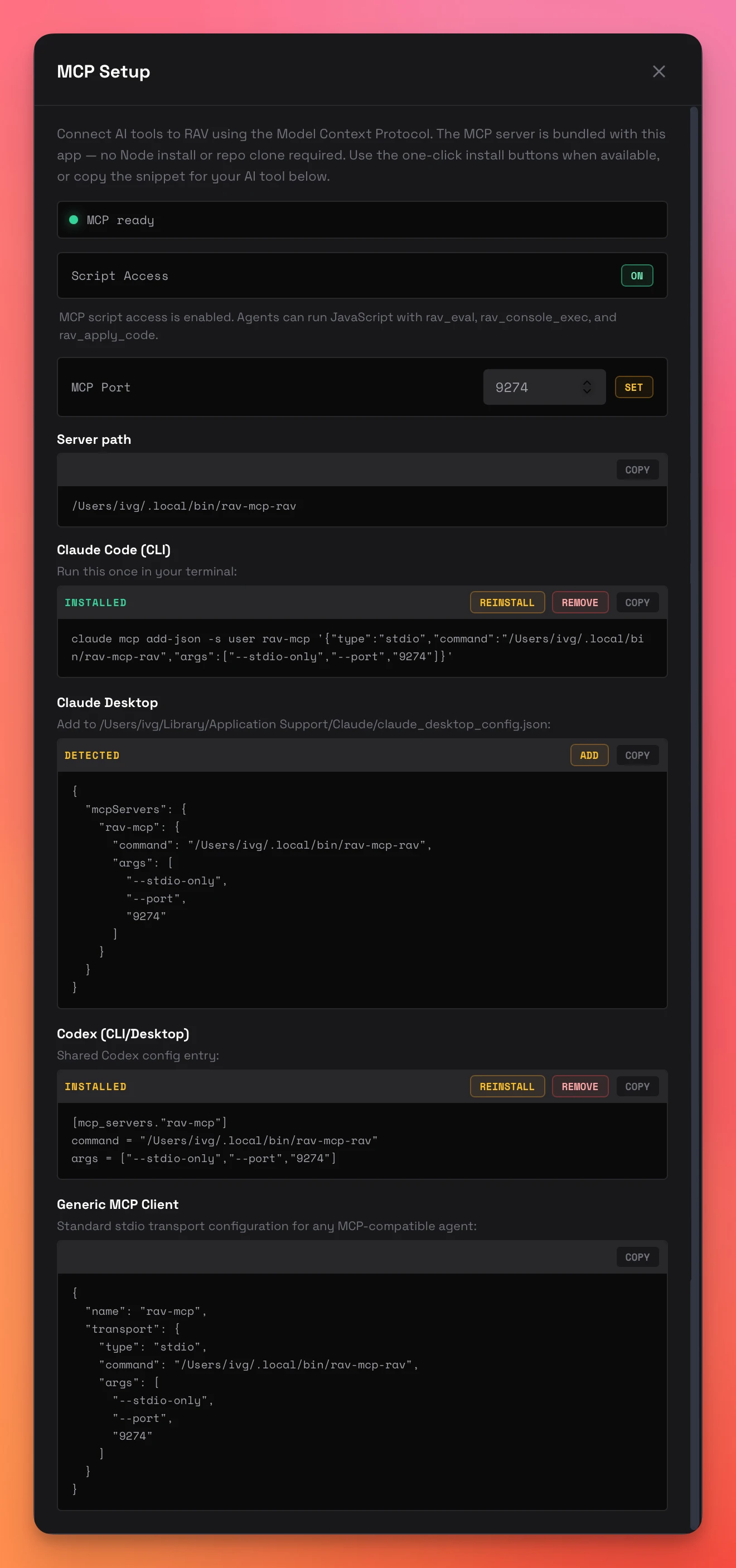
Open the MCP Setup dialog from the toolbar cable icon. It provides:
- Status row — MCP ready or disabled
- Script Access — safety gate for JS execution tools
- MCP Port — editable bridge port with immediate snippet regeneration
- Client detection — checks Claude Code, Claude Desktop, and Codex
- Install actions — ADD, REINSTALL, or REMOVE based on detected state
- Manual snippets — copy-paste configurations for any MCP client
Available Tools (56)
The bundled native sidecar advertises 56 unique tools. Root ViewModel paths use the regular rav_vm_* tools; global ViewModels use a separate global name plus property path. Eight desktop media tools expose the same export and recording service as the EXPORT menu.
| Tool | Description |
|---|---|
rav_status | App status: file, runtime, playback, canvas sizing, ViewModel summary |
rav_entitlement_status | Machine id and activation state; pass an activation key once to activate optional capabilities |
rav_set_anonymous_usage | Enable or disable Anonymous Usage reporting |
rav_open_file | Open a .riv file by absolute path |
rav_play / rav_pause / rav_reset | Playback controls |
rav_get_artboards | List artboard names |
rav_get_state_machines | List state machine names |
rav_switch_artboard / rav_reset_artboard | Switch artboard/playback or reset to default |
rav_switch_vm_instance | Switch the active artboard-bound ViewModel instance |
rav_get_vm_tree | Current live root ViewModel hierarchy with paths, types, values, and dynamic list bounds |
rav_vm_get | Read a root ViewModel property, including zero-based list paths such as rows/0/name |
rav_vm_set | Write a root ViewModel property |
rav_vm_set_image | Set a root ViewModel image property |
rav_vm_clear_image | Clear a root ViewModel image property |
rav_vm_fire | Fire a root ViewModel trigger property |
rav_get_global_vm_tree | List named global ViewModels and their independent live trees |
rav_global_vm_get | Read a property from a named global ViewModel |
rav_global_vm_set | Write a property on a named global ViewModel |
rav_global_vm_set_image | Set an image property on a named global ViewModel |
rav_global_vm_clear_image | Clear an image property on a named global ViewModel |
rav_global_vm_fire | Fire a trigger property on a named global ViewModel |
rav_get_event_log | Recent event log entries (filterable by source) |
rav_get_editor_code / rav_set_editor_code | Read and write the script editor |
rav_apply_code | Apply editor code and reload (Script Access required) |
rav_set_runtime | Switch runtime (webgl2 or canvas) |
rav_set_layout | Set layout fit mode |
rav_set_alignment | Set art alignment within the canvas |
rav_set_canvas_color | Set background color |
rav_set_canvas_size | Set canvas sizing mode, dimensions, and aspect lock |
rav_capture_canvas | Capture the currently rendered RAV canvas as PNG image content |
rav_media_capabilities | Inspect verified encoders, formats, alpha support, limits, and production distribution state |
rav_export_media | Start an asynchronous whole/segment timeline export or current/timed still capture |
rav_record_start | Start live state-machine recording, optionally timed, with a clock: "live" | "offline" option and recording-clock interactions |
rav_record_stop | Seal a manual recording and begin finalization; continue polling its job |
rav_media_status | Read capture, encoding, verification, warnings, resolved settings, and output details |
rav_media_cancel | Cancel an active media job and clean that job's temporary capture |
rav_step_frames | Advance and draw an exact number of frames while not recording |
rav_pointer | Send normalized mouse down, move, up, or exit input to the live canvas |
rav_open_isolated_playback | Open playback in an isolated surface |
rav_export_demo | Export standalone HTML demo (programmatic, no dialog) |
rav_export_demo_visual | Visibly orchestrate the export dialog (selection, package, snippet mode) and save — for screen recordings or non-default selections |
generate_web_instantiation_code | Generate canonical web snippet with helpers and control values |
rav_toggle_instantiation_controls_dialog | Open/close the export controls dialog |
rav_configure_workspace | Set sidebar visibility, live source mode, and VM Explorer state |
rav_eval | Evaluate JS in browser context (Script Access required) |
rav_console_open | Open the bottom console panel, optionally setting mode, level, sources, and search |
rav_console_close | Close the bottom console panel |
rav_console_set_mode | Flip between Event Console, JS REPL, or closed without re-opening |
rav_console_set_filter | Drive the on-screen filter toggles: level for JS, sources for Events, plus search on either |
rav_console_clear | Clear the visible transcript of the active mode (or a specified mode); panel stays open |
rav_console_read / rav_console_exec | Read console output or run REPL code (exec requires Script Access) |
Media automation
Media tools are desktop-only and asynchronous. Call rav_media_capabilitiesbefore selecting a codec, then poll rav_media_status until the returned job is completed, failed, or cancelled. Omitting output_path opens the native Save dialog; unattended agents should supply an absolute path with the matching extension.
rav_record_start accepts scheduled typed ViewModel sets, trigger fires, image changes, and normalized pointer events. Operations run on the recording clock before the corresponding frame is drawn, and completion reports requested and applied times. Existing ViewModel and global-ViewModel tools can also be used interactively while a manual recording is active. Offline recording requires an explicit duration. rav_record_start also accepts clock: "live" | "offline"; offline is the default when a duration and scheduled interactions are both supplied, otherwise live.
rav_export_media and rav_record_start also accept prores (Apple ProRes 4444 in a .mov container, with or without alpha) and png-sequence / jpg-sequence (one file per frame). Sequence output_path values are directory paths. A non-empty destination is refused unless the caller explicitly sets overwrite: true; MCP does not open an overwrite prompt. H.264, H.265, JPG, and JPG sequences reject alpha requests. Sequence formats take a directory as output_path instead of a single file. See Media Export & Recording for formats, settings, GIF size controls, and recording behavior.
GLOBAL VM in RAV
When a file provides globals, the sidebar labels their collection GLOBAL VM above ROOT VM. GLOBAL VM starts collapsed, and each named global has its own independent expandable tree; opening one does not expand another.
Script Access
By default, MCP can read state and drive safe control operations. Enable Script Access in the MCP Setup dialog to unlock rav_eval,rav_console_exec, and rav_apply_code.