Configuration
Settings Panel
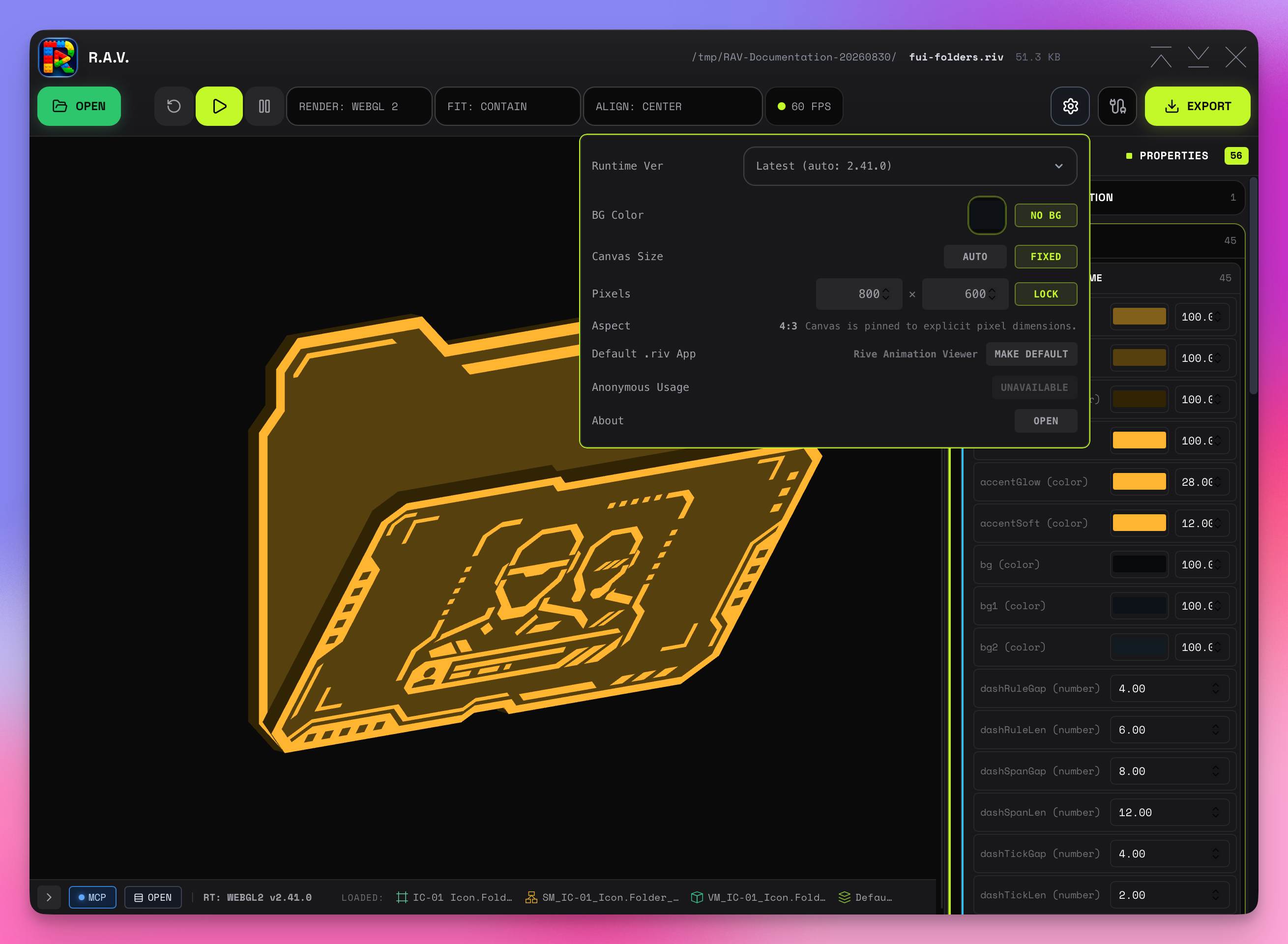
The Settings gear in the toolbar opens the configuration panel with:
- Runtime Ver — defaults to Latest (auto), with concrete versions and Custom semver available as explicit pins
- BG Color — canvas background color picker with NO BG reset
- Canvas Size — AUTO (fills viewport) or FIXED (explicit pixels)
- Pixels — width and height inputs with aspect-ratio LOCK
- Anonymous Usage — enables or disables anonymous installed-version reporting
- Default .riv App — shows the application macOS resolves for
.rivfiles; MAKE DEFAULT performs one association request without exposing registered aliases as separate steps, and REPAIR ICON refreshes RAV's document metadata afterward - About — opens build metadata, credits, dependencies, product links, and the Privacy Policy
The default-app row changes double-click/open-with handling and document registration only. Finder can repaint cached icons later, and Quick Look previews are supplied by a separate macOS provider.
For the script editor, supported config keys, APPLY behavior, internal vs editor live mode, and the window.riveInst surface, see Script Editor.
Renderer Selection
Choose between Canvas and WebGL2 in the toolbar. WebGL2 is recommended for vector feathering and complex animations.
The toolbar's GPU Canvas toggle is available only with the WebGL2 renderer. It enables Rive GPU Canvas features such as 3D shaders, and the preference is stored per app as ravGpuCanvasEnabled. Enabling it applies consistently to desktop playback, exports, and generated snippets.
Runtime Version
RAV defaults to Latest (auto) and resolves the current npm runtime before playback. If version discovery is unavailable, 2.39.2 is the fallback. Web 2.40.0 / runtime-v0.1.271 can double-offset nested, data-bound images in both WebGL2 and Canvas, so RAV labels that version with an authored-layout warning.
You can choose one of the concrete versions or Custom for a manual semver pin. Explicit global and per-file selections remain persisted and are embedded as the resolved concrete runtime version in exports.
Layout
Fit and alignment are surfaced directly in the main toolbar:
| Fit | Behavior |
|---|---|
contain | Fit entirely within canvas, preserving aspect ratio |
cover | Fill canvas, cropping as needed |
fill | Stretch to fill (may distort) |
fitWidth | Match canvas width, overflow height |
fitHeight | Match canvas height, overflow width |
scaleDown | Only shrink if larger than canvas |
none | No scaling, original size |
layout | Rive layout mode |
Canvas Sizing
In Settings, switch between AUTO (canvas fills the viewport) andFIXED (explicit pixel width and height). When fixed, an aspect-ratio lock keeps dimensions proportional while editing. Fixed sizes carry through to exports and snippets. Overflow-safe auto margins keep a fixed canvas centered while it fits; when it exceeds the viewport, the margins collapse and the canvas scrolls from the authored top-left origin with a styled 10px track, thumb, and corner.
A Fixed size defines the playback canvas viewport; it does not resize the authored Rive artboard. With contain, one artboard dimension always reaches the matching canvas edge, so alignment only moves visibly on the other axis when that axis has unused space. For example, a 16:9 artboard in a taller 500 × 409 canvas fills the width, making Top, Center, and Bottom visible while Left and Right have no horizontal space to use.