
Open. Inspect. Ship.
The standalone desktop tool for Rive animations. Load any .riv, bind ViewModels, drive state machines, and export production-ready code.
macOS 11+ · Windows 10+ · Free & open source
New to RAV? Open your first .riv file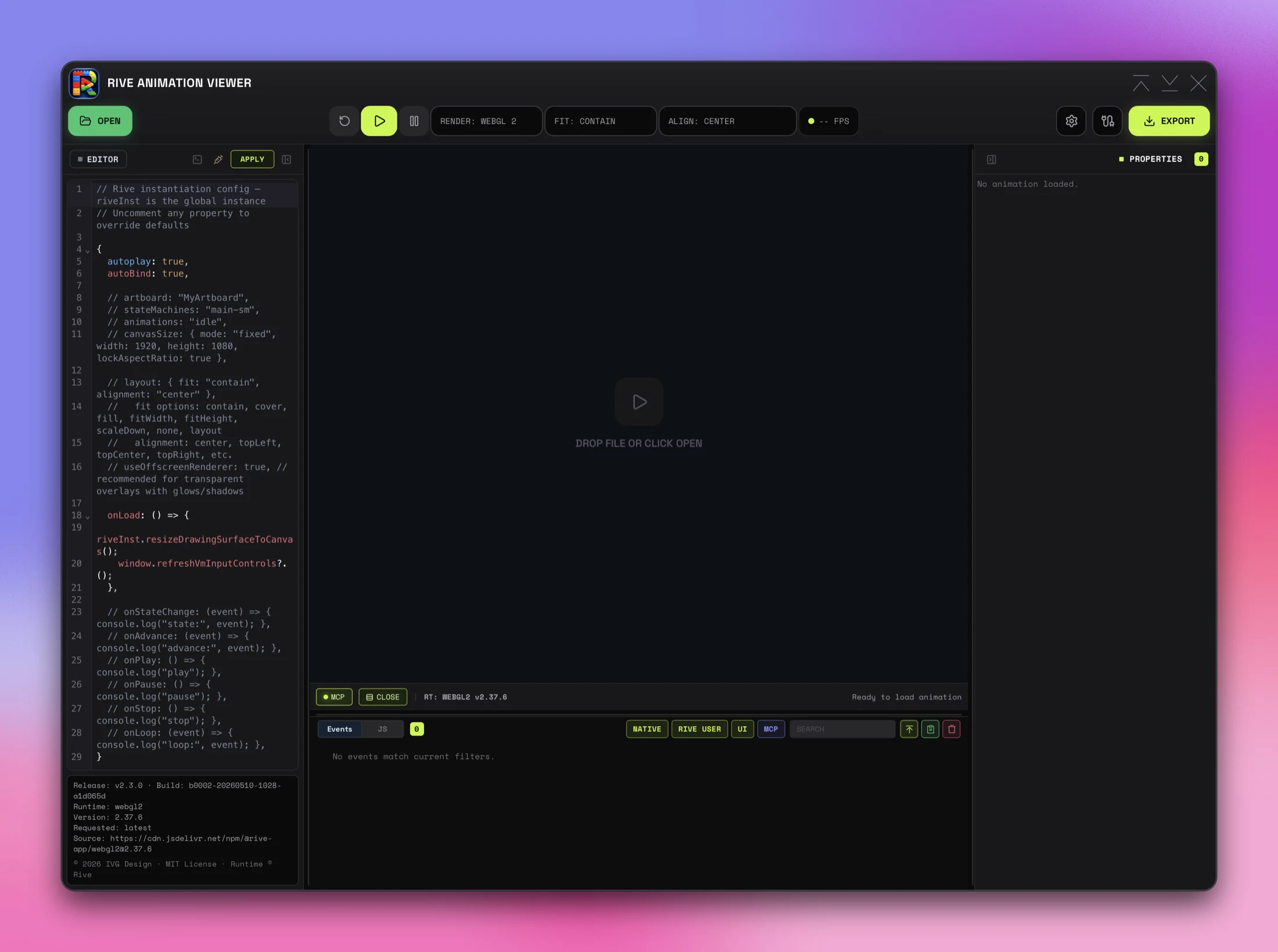
Title Bar
Custom window chrome with the RAV brand. Minimize, maximize, and close controls on the right.
Open
Load any .riv file from disk. Drag-and-drop onto the canvas works too.
Toolbar
Reset, play, pause, renderer (WebGL2 / Canvas), layout fit (contain / cover / fill / scaleDown / fitWidth / fitHeight / none / layout), alignment, and live FPS — all in one row.
Export & Settings
EXPORT generates self-contained HTML demos and copy-paste instantiation snippets with per-control selection. The neighbouring icons cover settings and MCP setup.
Script Editor
CodeMirror panel for the Rive instantiation config — autoplay, autoBind, artboard, stateMachines, layout, canvasSize, and lifecycle callbacks. Press APPLY to re-instantiate the runtime. Live build / runtime info anchored at the bottom.
Canvas
The animation viewport. Drop a .riv file here or hit OPEN. Renders via WebGL2 by default; switch renderer in the toolbar. Auto margins center fixed canvases and collapse safely for authored-origin scrolling.
Runtime Strip
MCP bridge health and recent-command activity, console toggle, runtime version label, and a structured status that restores after transient notices like canvas-size or runtime changes.
Console Panel
Two modes — Events log and JS REPL — sharing the bottom panel. Filter Events by source (NATIVE / RIVE USER / UI / MCP), filter JS by level, search either, follow latest, copy visible rows. All four filter toggles are also drivable from MCP.
Properties
Auto-discovered ViewModel controls with state-machine playback targets. List rows resolve authored labels; each image property uses one full-width select with embedded rasters, Open file…, and Clear.
Why this exists
Rive files are designed in the browser.
Testing them shouldn't require a web project.
RAV connects directly to the Rive runtime, auto-discovers every ViewModel property and keeps state-machine playback available, and gives you live controls without scaffolding. When the animation is ready, export the exact instantiation code your app needs — or let an AI agent drive the whole workflow through MCP.
Capabilities
What RAV does
Controls
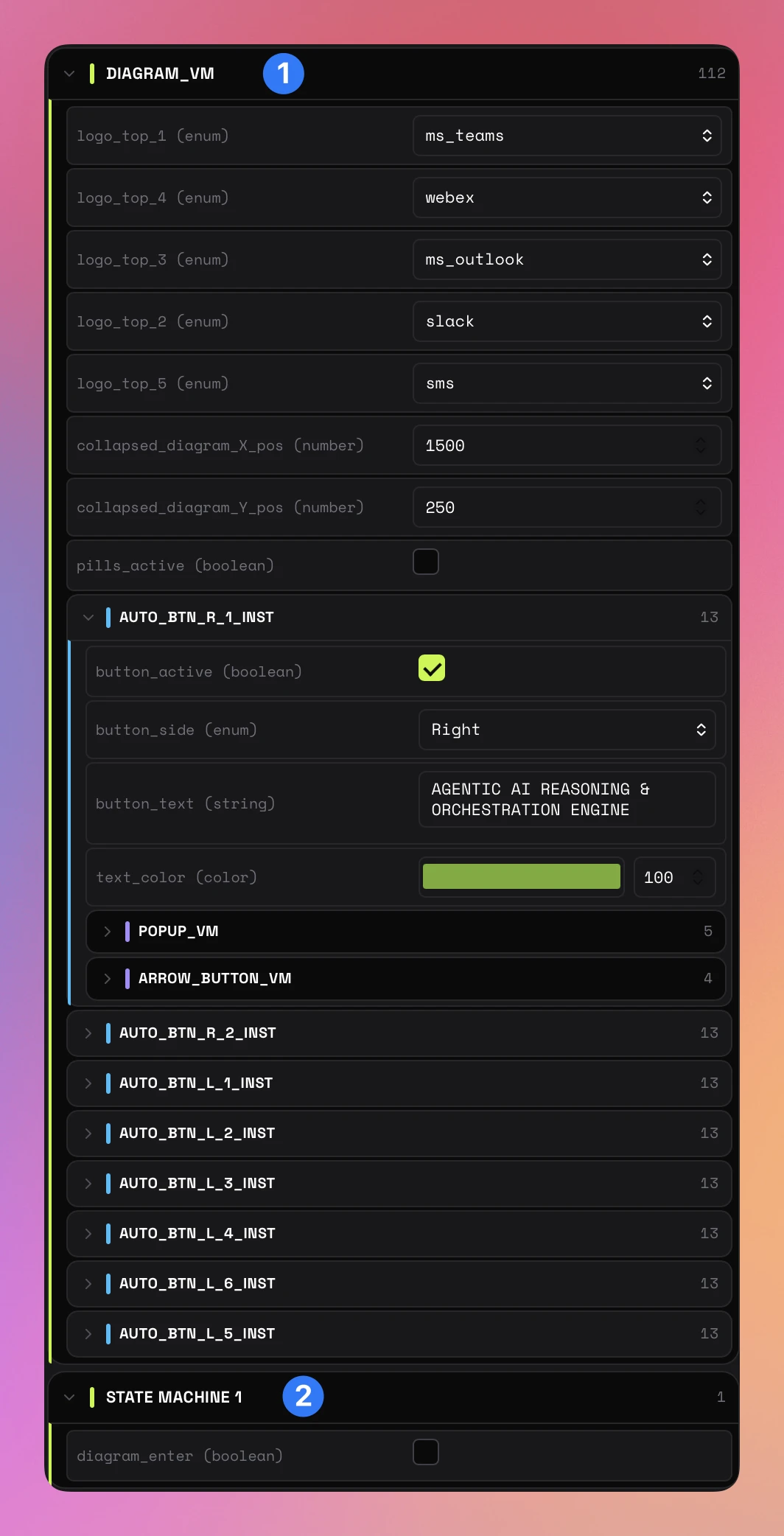
Every property, live
RAV reads the ViewModel hierarchy from your .riv file and keeps state-machine playback available. List rows resolve exact authored labels. Each image property gets one full-width select with every embedded raster, Open file…, and Clear; the external file input stays hidden.
Export
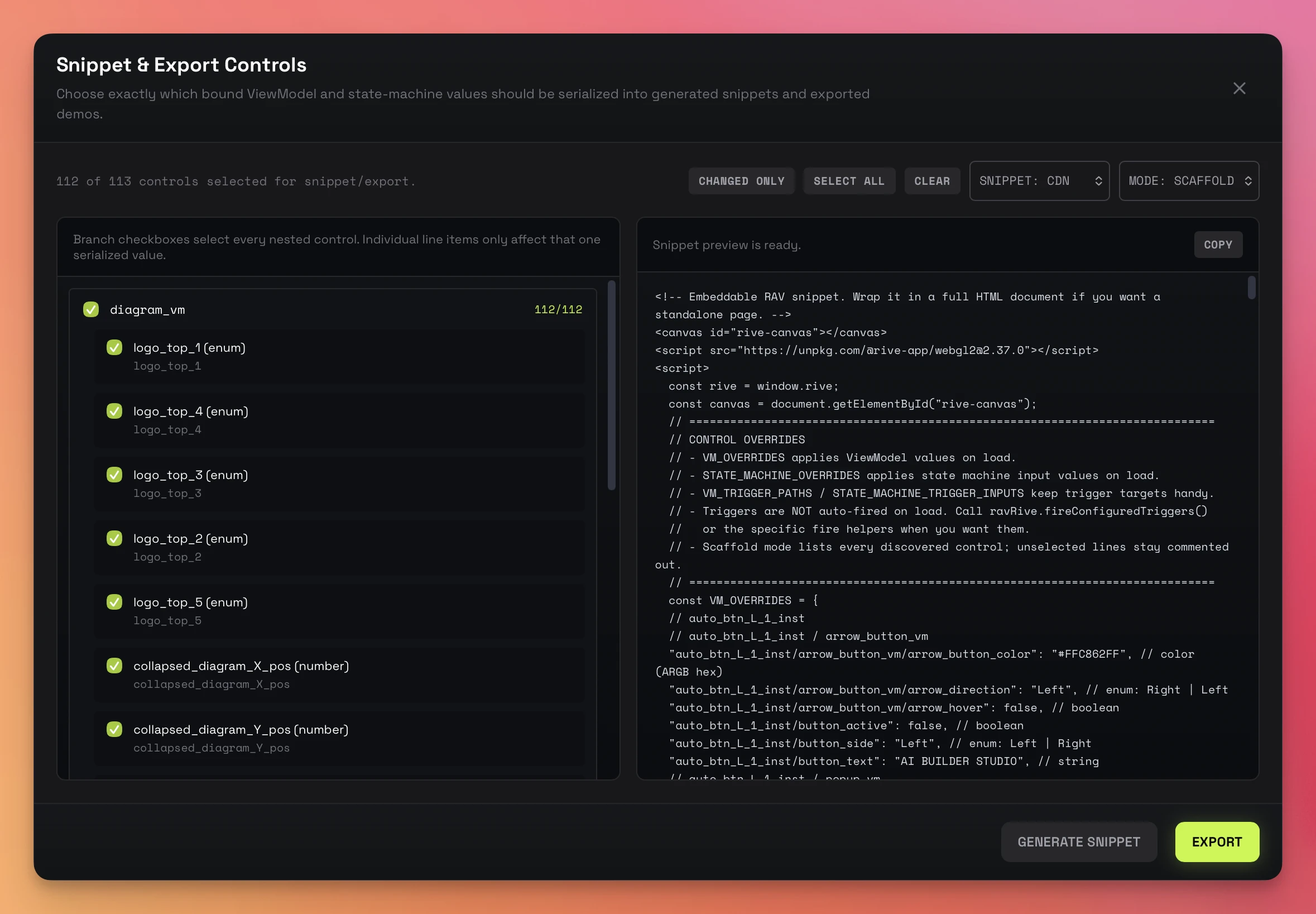
From animation to any output
Export H.264, H.265, WebM, APNG, GIF, PNG, JPG, or WebP from timelines and live state-machine interaction. Or choose controls, CDN or local packages, then copy a focused snippet or export a self-contained HTML demo.
MCP
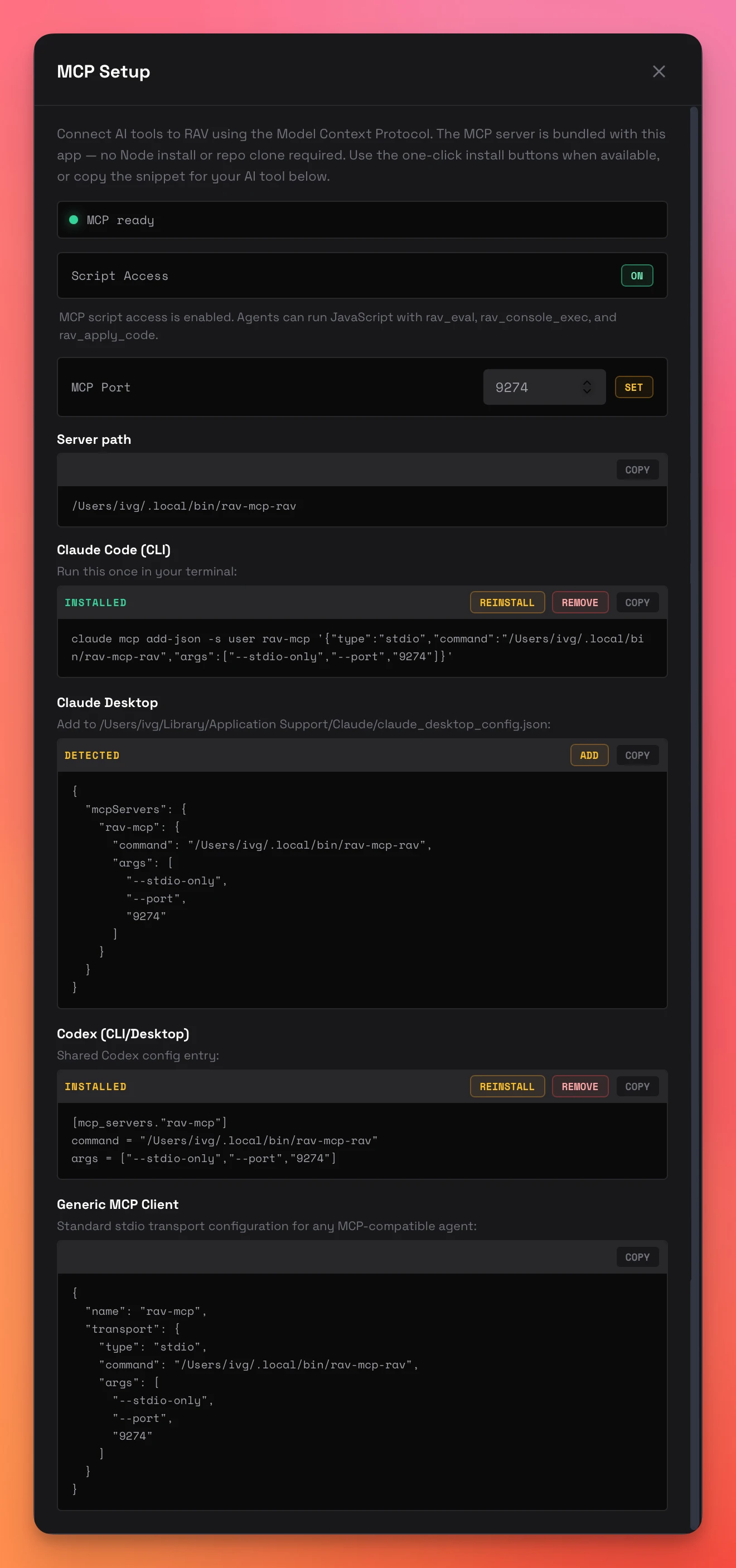
AI agents as co-pilots
A bundled native sidecar exposes 56 MCP tools. Claude, Codex, or any MCP client can inspect and drive playback, record timed interactions, export every media format, edit scripts, generate snippets, and control the console panel. One-click install from the app.
Artboard switching
Switch artboards and playback targets from dropdowns. VM controls repopulate per target.
Dual consoles
Event log and JavaScript REPL with timestamps, follow mode, level filters, and copy.
Script editor
CodeMirror 6 with live source indication. Apply configuration without losing artboard state; standalone exports preserve and execute it.
Renderer + runtime
Canvas or WebGL2 with Latest (auto) by default. Concrete and custom semver pins remain available, with the known 2.40.0 authored-layout risk labeled.
Canvas sizing
Auto or fixed pixel dimensions with aspect lock. Overflow-safe auto margins center fixed canvases until styled scrolling is needed.
State preservation
Reset and reload preserve artboard, playback, and control values across re-instantiation.
Auto updates
Tauri-authenticated updates, with Developer ID signing and notarization on macOS.
VM Explorer
Inject the helper snippet for vmExplore, vmGet, vmSet, vmTree, and vmPaths debugging.
Interface
More of the app
Download
Ready when you are
Free, open source, and shipping for macOS and Windows.
All releases on GitHubRAV installations
Retrieving anonymous total…
Recent updates
v2.5.8
LATEST PUBLIC- Machine ID on Windows — The About window's Machine ID row and rav_entitlement_status reported "Machine identity is unavailable on this platform" on Windows, so activation could not be requested there. The id is now derived from the installation's MachineGuid on Windows, from the hardware UUID on macOS, and from /etc/machine-id elsewhere; existing activation keys are unaffected.
v2.5.7
- Machine ID in About — The Build Matrix in the About window shows this installation's machine id with a copy button. Optional capabilities are activated per machine and user account; the id is what you send when requesting one.
- MCP rav_entitlement_status — Advertised in tools/list. Without arguments it returns the machine id. Given an activation key it verifies the key, stores it for this machine and account, and keeps it active until the key expires, so later sessions and agents need no key. The advertised tool set can change after activation; the server now declares tools.listChanged and sends notifications/tools/list_changed.
- Left panel footer — Reads "© 2026 IVG Design · MIT License"; the runtime credit moved out of that line.
- Large files took minutes to inspect — The bundled file-inspection module is rebuilt on RF Parser 2.5.14, which removes a quadratic object lookup introduced in parser 2.5.11. A 13 MB production file that previously ran past the inspection deadline now inspects in about a second, and the exported timeline data lists only data-bound keyframes again.
- Timeline scrubber jitter — During linear-animation playback the current-time indicator oscillated back and forth by a frame or two. The host smooths the indicator between child clock samples; a second, throttled state broadcast carried an older snapshot of the same clock and was allowed to move the indicator backward. The presented time is now monotonic while a timeline plays, late samples only slow it, and real rewinds such as loop restarts and seeks still apply immediately.
- Timelines authored at a speed other than 1× — Rive timelines carry a playback multiplier, and many production files use it (0.4×, 0.2×, even 0.02× and reversed −1×). The scrubber assumed 1×, so its indicator ran ahead of the real clock and snapped back. The child now reports the authored speed, the indicator advances at that speed, the readout shows the multiplier (for example "12 / 240 FR · ×0.2"), and reversed timelines keep left-to-right travel with the frame and time values, ruler and slider counting down.
- Stale timeline wrapper after switching artboards — When two artboards share an animation name, the runtime keeps the previous artboard's wrapper with a frozen clock; the child could report that frozen clock instead of the live one. Movement is now tracked per wrapper, so a frozen wrapper is never chosen while the live one advances.
- +8 more
v2.5.6
- GPU Canvas toggle — A WebGL 2-only toolbar button enables Rive GPU Canvas (enableGPUCanvas) for desktop playback, standalone HTML, and generated snippets. The Snippet & Export dialog carries a matching GPU CANVAS option; the preference persists across launches. Enabling it disables the offscreen renderer for that instance.
- Parse-once file inspection — Artboards, animations (with fps/duration/work area), state machines, ViewModel prototypes, instances, nested relations, lists, and embedded image assets are read once from a private copy of the file bytes in a worker, without instantiating a Rive runtime. Inspection is cached per source identity; the ViewModel hierarchy and topology tracker map live accessors onto that schema and only fall back to runtime discovery when the map cannot be matched.
- Off-thread capture pipeline — Recording snapshots each rendered frame as a GPU bitmap and hands it to capture workers that compose, build VideoFrames, run the hardware encoder, and compress PNG (three parallel workers for lossless/alpha capture, delivered in order). The recording loop schedules itself and yields to the compositor between bounded batches, so the visible canvas keeps presenting while heavy files record. Measured on a heavy file: main-thread stalls went from 6–8 per second (~200 ms each) to zero, and the preview went from 4–9 fps to the capture rate.
- Offline recording clock — rav_record_start accepts clock: "live" | "offline". Offline renders every simulation frame exactly, as fast as capture allows, never consults wall time, and draws at exactly the output size; it is the default when interactions and duration_seconds are both supplied. clock.mode in receipts reports offline, fixed-step or presentation.
- +5 more
- Single Rive owner on desktop — The main window no longer instantiates a hidden Rive player or evaluates the Rive runtime; it only prepares the runtime asset for the child. Selection seeding, artboard switching, VM instance lists, and embedded image catalogs come from inspection metadata and the child's canonical state. Host VM controls update from canonical deltas (event mode) instead of polling.
- Background playback — The native 60 Hz wake lane is enabled only while a native-owned recording is active. Ordinary playback stays on the child's own animation frames; there is no native polling fallback for hidden or occluded playback. Recording start/stop are the only wake events, so idle desktop playback costs zero WebView IPC.
- Recording — Scheduled interactions are validated against live accessors before the clock starts and retain a prepared accessor as a fallback; frame-clock errors are terminal; the stop drain is event-driven with a 15 s inactivity deadline; the recording cursor overlay is installed only when cursor is requested; standalone captures use enableGPUCanvas when selected. Native wake ticks during recording are now kicks that end a wait early and never run capture work.
- Child replacement — Rendering-control commands carry a sequence number; a quiesce delayed behind a long frame can no longer suspend a predecessor the host already resumed.
- +9 more
- Sequence destination confirmation — Exporting or recording a PNG/JPG sequence to a non-empty folder offers Overwrite, Choose folder…, or Cancel instead of a raw error. Settings survive cancellation and folder changes; overwrite consent applies only to that request, and begin-time conflicts reopen the same prompt. MCP callers must still explicitly pass overwrite: true.
- Enum dropdown focus — A focused enum dropdown is treated as editing, so remote value syncs defer instead of rebuilding an open popup.
- Fast encoder completion — A terminal encoder event arriving before the finish command's response no longer gets overwritten by the command's initial snapshot.
- Recording cleanup — The native wake lane and liveness suspension are released on every recording exit path (finish, cancel, failure, source change); failures to stop the clock surface as job warnings.
- +5 more
- State-machine input controls and MCP tools — rav_get_sm_inputs and rav_set_sm_input are removed (55 tools). The Properties drawer, export control tree, generated snippets, control snapshots, and canonical state no longer carry state-machine descriptors. State machines remain selectable playback targets; ViewModel properties are the supported control surface.
- Native encoding of alpha WebM (VP9 with an alpha plane) at large sizes (≈2560×1440) can exceed the encoder's 768 MB memory ceiling and fail after capture; use ProRes 4444 or a PNG sequence for large alpha output.
- Lossless capture (ProRes, WebM alpha, APNG, GIF, image sequences) moves 5–8 MB per full-size frame out of the render WebView; on a 2560×1440 capture that tops out near 20 frames/s in live mode (the receipt reports the lag) while offline mode simply takes longer than real time and stays exact. Hardware-encoded H.264/HEVC/VP9 are unaffected.
- APNG encoding of long, large captures is slow (minutes) and produces very large files; it is unchanged in this release.