manifest
{ "app": "ci.bot",
"title": "Build passed",
"status": "OK",
"body": "142 tests, 0 failures · main",
"log": "https://ci.example.com/142",
"action": "deploy"
}
Any app declares the data it can send. You design, on a grid of any size, exactly how it shows up: persistent, interactive banners with history, sound and actions. They stay until you deal with them, sit above everything, and never steal focus.

Deploy finished
Built in 42 s with no warnings. The new landing page is live.
Deploy finished
herald.site
Built in 42 s with no warnings. The new landing page is live.
A system alert can stay on screen, but it is one Apple template with the buttons the app registered, and it can take focus. A Herald banner is laid out by you, acts on your Mac, never takes focus, and every one lands in a searchable history.
An app registers a manifest once: the fields it can send, sample values, the actions it offers. You lay those fields out in the Designer. Every notification from then on is rendered through your template.
Nothing is empty: all three rows are drawn.
142 tests, 0 failures · main
As many rows and columns as the banner needs, merged where you like. Drop fields, images, badges, buttons, progress bars, SF Symbols and Rive animations into cells; align them on nine points; decide whether an empty field collapses or holds its place.
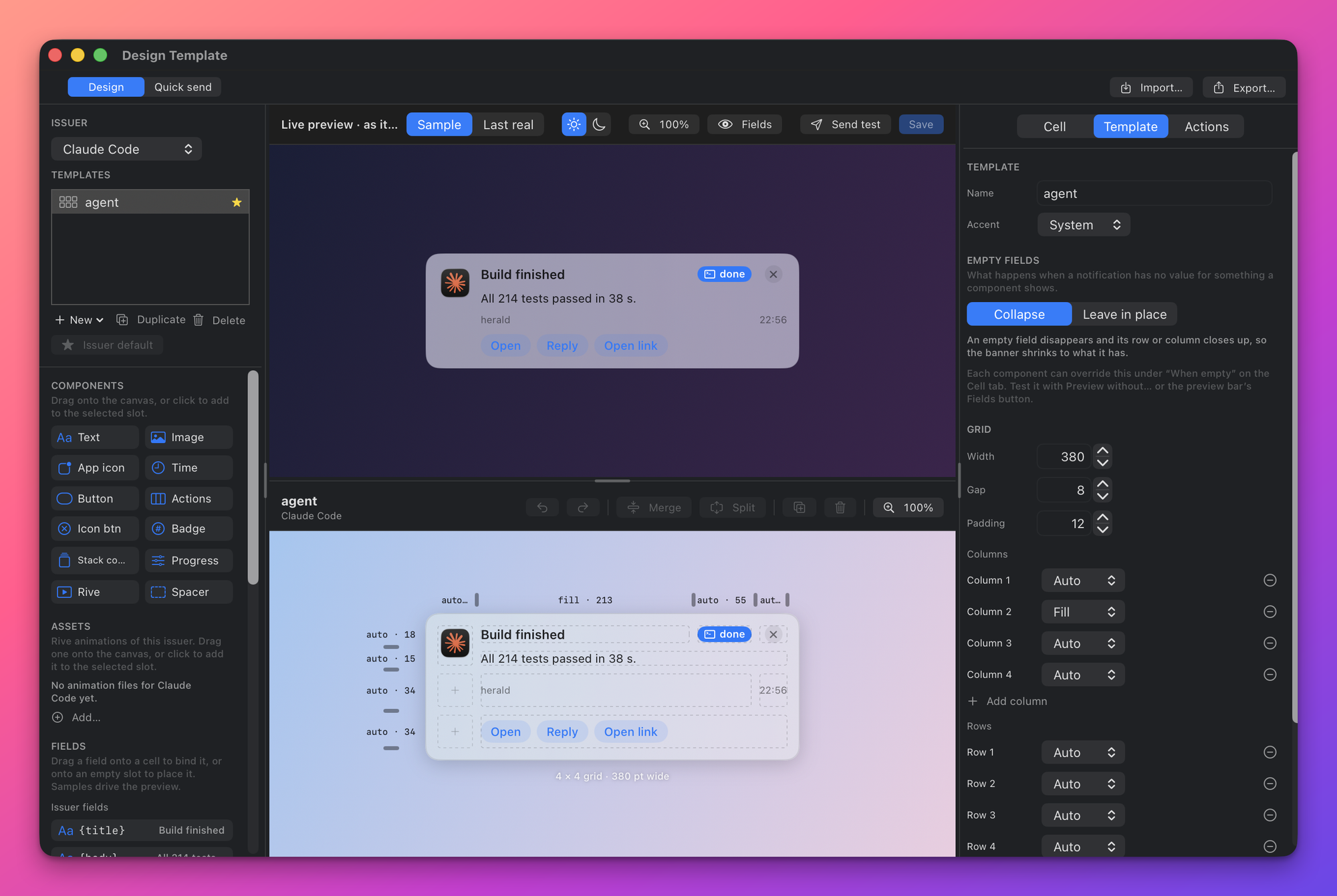
Hover or focus a region of the Designer
Pick the app you are designing for. Its manifest fields become the tokens you place; each issuer keeps its own templates and a default.
The real banner, rendered by the same code that draws it on screen. Sample data or the last real notification, light or dark. Send test shows it for real.
Any rows × columns. Drag the rulers to resize tracks, merge or split cells, drop components, align on nine points. The dashed cells are empty slots.
Everything about the selection: name, accent, what empty fields do (collapse or leave in place), grid width, gap, padding, every column and row.
Text, image, app icon, time, button, actions, icon button, badge, stack count, progress, Rive animation, spacer. Drag onto a cell or click to add.
Rive files the issuer ships, and the issuer’s fields with their sample values. Drag a field onto a cell to bind it.
Pick the app you are designing for. Its manifest fields become the tokens you place; each issuer keeps its own templates and a default.
The real banner, rendered by the same code that draws it on screen. Sample data or the last real notification, light or dark. Send test shows it for real.
Any rows × columns. Drag the rulers to resize tracks, merge or split cells, drop components, align on nine points. The dashed cells are empty slots.
Everything about the selection: name, accent, what empty fields do (collapse or leave in place), grid width, gap, padding, every column and row.
Text, image, app icon, time, button, actions, icon button, badge, stack count, progress, Rive animation, spacer. Drag onto a cell or click to add.
Rive files the issuer ships, and the issuer’s fields with their sample values. Drag a field onto a cell to bind it.
An app ships its own actions in the manifest. You can relabel, hide, reorder them, or add your own: open a URL, run a shell command or script, trigger an Apple Shortcut, call back into the app. Dangerous ones ask first, inline, without a dialog.
All 214 tests passed on main.
Mark an action as needing confirmation and Herald swaps the button row for a yes/no strip inside the banner. Press Deploy on the banner to see it. Callbacks report success, failure or still-running, so a banner is only dismissed when the thing actually happened.
Pick windows where voice and sound stay off and, if you want, banners wait. Per app overrides for the ones that may wake you.
voice and sound muted 22:00–07:00
Same sender again? The banner doesn’t multiply, the count goes up. Click to fan the stack out, dismiss the whole group at once. Group by app, by issuer, or by sender.
The count goes up; click the banner to fan the stack out.
Rive <[email protected]>
Attach a spoken message to any notification. Local neural TTS, nothing leaves the Mac, and the text is logged so you can read what you missed.
“Build passed. One hundred forty-two tests, zero failures.”
Kokoro, rendered on the Mac. This is the real voice; the text always lands in History.
An agent running in the cloud, ChatGPT, Codex, Claude, can reach your Mac even when you’re not looking at it. It sends a banner that reads itself aloud, asks you a question, and waits for your answer: typed, or spoken into the banner with one press.
All 214 tests passed on main. Say the word and I’ll ship 4f2a to prod.
Receipts: received · displayed · spoken · replied
Type a reply or press Record. Nothing leaves this page.
Herald ships an MCP server with 60+ tools. Local agents, Claude Code, Codex CLI, Claude Desktop, install it with one click, or with the steps in the MCP guide, and can register an app, author a template, attach a script or a Shortcut, render a preview and send a test. Cloud agents reach the same Mac through your relay, with OAuth or a device code you approve in a banner.
How to install opens the steps for that client in the docs. The app does the same in one click.
Loopback HTTP + JSON on 127.0.0.1 with a bearer token Herald writes for you. Clients for Swift, Python and Node; a CLI for everything else.
curl -X POST http://127.0.0.1:48617/v1/notify \
  -H "Authorization: Bearer $(cat ~/Library/Application\ Support/Herald/token)" \
  -H "Content-Type: application/json" \
  -d '{"app":"ci.bot","title":"Build passed",
       "body":"142 tests, 0 failures",
       "buttons":[{"label":"Open","url":"https://ci.example.com/142"}],
"speak":true}'import HeraldClient
let id = try await HeraldClient.shared.notify(HeraldNotification(
app: "ci.bot", title: "Build passed", body: "142 tests, 0 failures",
buttons: [HeraldButton(label: "Open", url: "https://ci.example.com/142")]))from herald import Herald
Herald().notify(app="ci.bot", title="Build passed", body="142 tests, 0 failures",
buttons=[{"label": "Open", "url": "https://ci.example.com/142"}],
speak=True)const { Herald } = require('./herald');
await new Herald().notify('ci.bot', 'Build passed', {
body: '142 tests, 0 failures',
buttons: [{ label: 'Open', url: 'https://ci.example.com/142' }],
speak: true,
});herald notify --app ci.bot --title "Build passed" \
--body "142 tests, 0 failures" \
--button "Open=https://ci.example.com/142" --speakBuilding an app? Integrate Herald into your app walks through finding Herald, the manifest, buttons, a default template and testing.
Free and open source. Signed with a Developer ID and notarized by Apple. Menu-bar app, no account, nothing leaves your Mac.
1.9.1
build 23 · 2026-10-05
≈ 15 MB
DMG