Stop refreshing.Start knowing.
WebWatcher sits in your menu bar and watches the badges, counters and inboxes you keep checking by hand, the Rive community bell, a Gmail sender, a forum thread, and tells you the moment they change.
Apple Silicon only. macOS 13 or later. Developer ID signed and notarized. MIT. Nothing leaves your Mac.
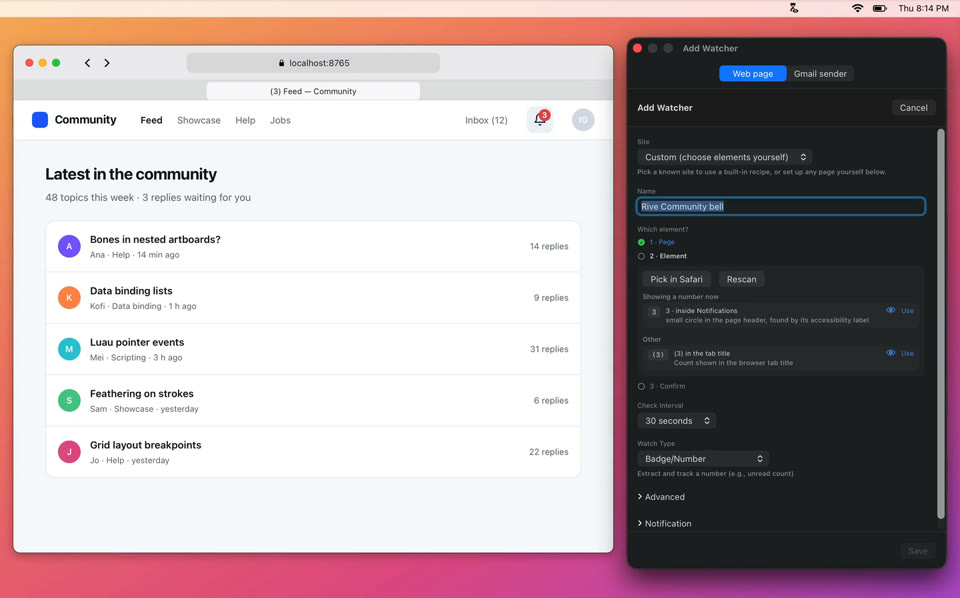
The real app, 15 sAdding a watcher for a community bell and getting the first notification. Recorded from WebWatcher 1.10.9.
Every 30 seconds it looks. 2,880 looks a day, 20,160 a week. You make none of them.
Each watcher has its own timer, set to the interval you pick for it. A check reads the page from a Safari tab, and opens one in the background if there is none. A change posts one notification.
The default. Change it per watcher in the app.
A watcher on this interval looks 120 times an hour.
Three steps. No DevTools.
You never type a selector. WebWatcher reads the page that is already open in Safari and walks you to the element.
Inbox
Dana Whitfield Harbor & Co
Can you send the revised quote before Friday?
Priya Raman Kite Labs
Scope for the May sprint, ok to start?
Marcus Lee Northwind
Contract draft v3 attached
Tomás Ibarra Foxglove
Thanks, invoice received.
Add Watcher
Found in Safari: Inbox · Contra
contra.com/inbox
You never type a selector. WebWatcher reads the page that is already open in Safari and walks you to the element.
It reads the page so you don’t have to.
This is the real flow, on a sketch of a community page. Scan the page, select a candidate to see exactly what WebWatcher would track, or point at the element yourself the way Pick in Safari does.
Which element?
community.rive.app/feedFound in Safari: Feed | Rive Community
Scan page reads the tab through Apple Events and lists what looks watchable.
It reads
nothing yet
No watchers yet. Scan a page and add one.
Simulation on a sample page. In the app the same steps run on the tab you have open in Safari.
Badges are the start.
Six ways to read a page. The picker chooses one for you. Pick by hand when you know better. Click a row to change its page and check it now.
Site profilesRive community, LinkedIn, Reddit, Contra, and any site with a (N) tab title. One click fills in the right strategy, selector and refresh behaviour.
Watch a sender, not an inbox.
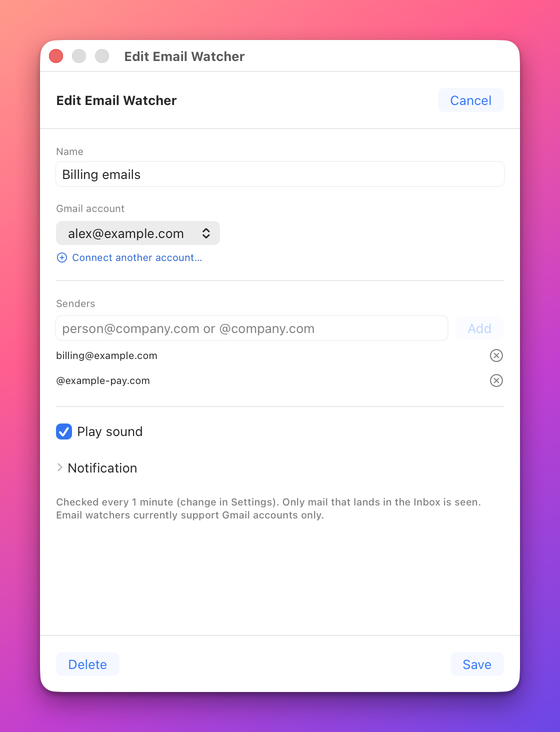
Sign in with Google once. Then watch one address, several, or a whole domain. New mail from them becomes a single notification that counts up as mail arrives. The menu count follows as you read, and the notification clears once nothing is unread. Click it to open the message. Archive, Mark as Read, Delete and Spam work on every message it counted.
- Senders
- One address, several, or a whole domain like @company.com.
- Checked
- Every minute. Change it in Settings.
- Seen
- Only mail that lands in the Inbox. Gmail accounts only.
Scope: gmail.modify only. Tokens stay in your Keychain. The app ships its own OAuth client, nothing to configure.

Make it talk back.
Herald turns WebWatcher’s alerts into banners that stay until you deal with them, can read themselves aloud, and carry the buttons that matter right on the banner: Archive, Mark as read, Delete. One switch in Settings. No Herald, no change.
 Get Herald
Banners stay until you act on them, stacked per sender or site.
Herald can read a banner aloud. Press the speaker on a banner. This is the real sample.
0:00.0 / 0:04.2It runs on your Mac, in your Safari, and nowhere else.
Checks run in the Safari tab you are already signed into, nothing is proxied or logged, and your config lives in ~/Library/Application Support/WebWatcher/. Gmail tokens stay in the macOS Keychain with the gmail.modify scope only. The app is Developer ID signed and notarized, MIT licensed, with the source on GitHub.
Three switches, once
The only setup macOS asks for. Try them.
Stop refreshing today.
Free, open source, no account. Drag to Applications, flip three switches, add your first watcher in under a minute.
- macOS 13 Ventura or later. Apple Silicon only (arm64 build).
- Safari. The page you watch stays open in a tab.
- Optional: a Google account for Gmail, Herald for persistent banners.
Apple Silicon (arm64) only. macOS 13 or later.